
Manage My Wedding Planner
Yvette SittersEvents
4.211.00 Reviews
- Version
- 7.1.0
- Installs
- 10.00K
- Age Rating
- Everyone
Screenshots
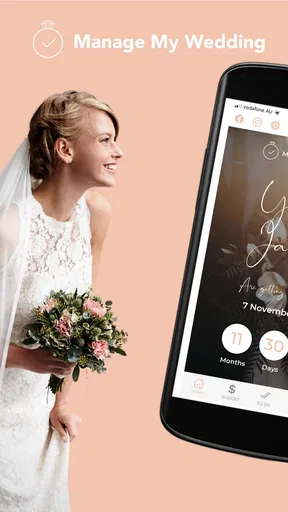
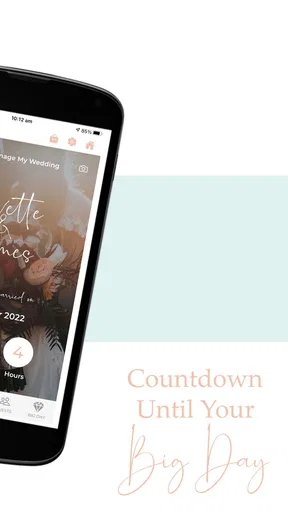
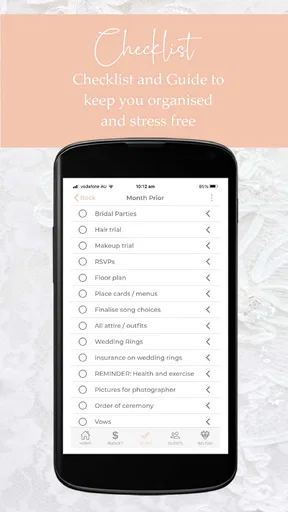
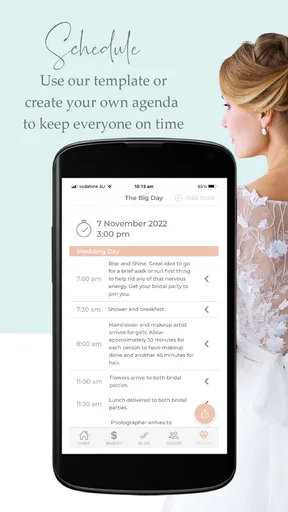
Our Review of Manage My Wedding Planner
 Analysis by Appyee
Planning a wedding can turn into a second job surprisingly quickly. Guest details, appointments, spending decisions, supplier conversations, and small deadlines all compete for attention, which is why I found Manage My Wedding Planner appealing as an events app rather than just another checklist. Its purpose is narrow and practical: help me keep wedding planning in one place without making the process feel even more complicated.
Manage My Wedding Planner is free, aimed at everyone, and developed by Yvette Sitters. It has built a modest but meaningful audience, with over ten thousand installs, an average rating of 4.2 from around sixty ratings, and eleven written reviews. Those figures suggest a useful niche tool rather than a universally adopted planning platform, and that distinction matters when deciding what to expect from it.
I would recommend trying it if you want a dedicated wedding-planning companion on an Android device running version 6.0 or later. I would be more cautious if you expect a full collaboration suite, a polished supplier marketplace, or the same depth as a desktop spreadsheet and project-management system. Its strongest appeal is focus: it is about organizing the wedding itself, not managing every part of your life.
How the planner feels during ordinary wedding planning
I’d use this section to judge the planner by the small, repeated tasks that shape a real wedding week: capturing a decision after a conversation, checking what still needs attention, and returning to unfinished items without restarting from scratch. That ordinary rhythm also makes it easier to see where personal judgment and careful record-keeping still matter.
A focused starting point instead of a blank document
The first advantage of a wedding-specific app is that I do not have to design the planning system from scratch. A blank notes app gives me freedom, but it also leaves me wondering what I should record, when I should review it, and whether I have forgotten an important area. Manage My Wedding Planner is built around the idea that wedding preparation needs structure, which makes it easier to approach the work in smaller pieces.
That focus is especially useful during the early stage, when everything feels equally urgent. I can think about the ceremony, reception, guest arrangements, suppliers, and personal decisions as separate planning concerns instead of one enormous task. Even when I am only using the app for a few minutes, that separation can make progress feel more visible.
The store summary describes the goal as planning a dream wedding without the overwhelm, and I think that is a fair description of the app’s role. It does not remove the decisions, but a dedicated place for those decisions can reduce the mental effort of remembering where everything belongs. I see it as a planning companion, not an automatic wedding coordinator.
What I would use it for week by week
A realistic routine would be to open the app once or twice a week, review the areas that need attention, and update the next small group of decisions. For example, I might use one session to settle questions about the guest list, another to review arrangements with a supplier, and a later session to check whether an upcoming appointment or purchase still fits the overall plan.
The important habit is not to enter every thought immediately. I would first decide whether an item is a real task, a decision waiting for information, or a note I may never need again. Keeping those categories mentally separate makes a planner more useful. Otherwise, even a well-organized wedding app can become a digital drawer full of unfinished ideas.
One practical tip is to review the app after every major conversation. If a venue changes a condition, a family member confirms attendance, or a supplier gives a new deadline, I would record the change while it is still fresh. That workflow is more reliable than trying to reconstruct a week of conversations from memory, especially when several people are involved.
Speed expectations on a supported phone
The current version is 7.1.0, and the minimum operating system is Android 6.0. That broad compatibility is helpful for people using an older phone, although compatibility alone does not tell me how fast the app will feel on every device. I would expect the basic planning experience to be comfortable on a normal supported handset, but I would not treat the minimum requirement as a promise of identical performance on older hardware.
For this kind of app, perceived speed is less about demanding graphics and more about how quickly I can open it, find the right planning area, and save a change without interruption. A planner that makes me wait during every small update becomes annoying because wedding planning involves many short visits rather than one long session. The best experience should feel like checking a paper organizer, only easier to revise.
I also prefer a modest planner that stays focused over one overloaded with visual extras. More images, animated dashboards, and elaborate presentation can make an app feel impressive, but they do not necessarily help me decide who needs a reminder or which arrangement needs attention. Manage My Wedding Planner’s value is tied to how directly it lets me move from thought to organized action.
What happens during heavy-use moments
The busiest period is not necessarily the day I install the app. It is the stretch when guest information, supplier discussions, appointments, and last-minute decisions begin arriving together. That is when I would test whether the app remains manageable. A useful planner should help me return to the right area quickly instead of forcing me to search through unrelated notes.
I would avoid making one enormous planning session the center of my workflow. Long sessions encourage duplicate entries, half-finished notes, and decisions made without checking the rest of the wedding. Shorter sessions are safer: update one topic, confirm what changed, then leave. This also gives me a simple way to notice whether the app is responding consistently over time.
A second useful approach is to create a personal priority order outside the app before opening it. I might decide that today’s order is guest information, venue questions, then personal purchases. That prevents the planner from becoming a place where I browse endlessly without completing anything. The app can hold the structure, but I still need to supply the judgment.
There is also a trade-off in keeping wedding planning in one dedicated application. It reduces scattered information, but it can become a problem if a partner, parent, or supplier does not use the same tool. In that situation, I would treat the app as my planning control center and keep any shared communication in the channel everyone already understands. I would not assume that a personal organizer automatically replaces group coordination.
Reliability and recovering from interruptions
Reliability matters more here than flashy presentation. Wedding details are often entered while I am travelling, waiting for an appointment, or speaking with someone in person. If the app closes, loses an update, or makes me unsure whether a change was saved, confidence drops quickly. I would therefore use it in small steps and check important entries after saving rather than assuming every update is safely recorded.
My most important recovery habit would be keeping a separate record of truly critical information. A supplier’s phone number, a payment confirmation, or a final guest decision should not exist only in one planning app. That is not a criticism unique to Manage My Wedding Planner; it is sensible protection for any organizer. The app can be the working plan, while essential documents and confirmations stay in their original places.
If I were interrupted by a call or had to switch apps, I would reopen the planner and verify the last item before continuing. That simple check prevents a common planning mistake: believing I completed a task when I only started it. It also gives me a realistic way to judge stability on my own phone without pretending that one person’s experience proves how the app behaves everywhere.
I would be particularly careful during the final weeks. At that point, I would avoid making major structural changes to my planning method. Keeping the same categories and review routine is easier to recover from than reorganizing everything shortly before the wedding. A planner is most dependable when I use it consistently, not when I expect it to rescue a disorganized process at the last minute.
Device constraints and everyday practicality
Because the app supports Android 6.0 and newer, it may suit people who keep an older Android phone instead of upgrading regularly. That is a practical strength for a simple planning tool. At the same time, an older phone may have less comfortable screen space, slower switching between applications, or a battery that is already under pressure from other tasks. Those limitations come from the device environment as much as from the app itself.
I would also consider how I normally plan. If I prefer a large screen for comparing many guest details at once, a phone-only workflow may feel cramped. If I usually make decisions while away from a desk, the mobile format is more convenient. The right choice depends less on the wedding size than on whether I naturally reach for my phone when I need to capture or review information.
Resource demands are difficult to judge from the app’s category alone, so I would not promise exceptional battery use or storage efficiency. My practical advice is to notice whether the app remains comfortable during a normal week of short check-ins. If it feels slow, drains the battery noticeably, or becomes difficult to navigate on an older handset, I would move the detailed planning work to a larger device or a lighter personal system.
Another constraint is attention. A phone is convenient, but it is also full of messages, calls, photos, and distractions. I would not open the planner when I am already rushing between appointments and expect a thoughtful planning session. Two quiet minutes with a clear goal are more valuable than ten distracted minutes of random updates.
Useful workflows that are easy to overlook
My first non-obvious tip is to use the planner as a decision log, not only as a task list. When I choose between two options, I would note the decision and the reason behind it. Later, when someone asks why a choice was made, I can revisit the thinking instead of reopening the entire debate. This is especially useful when family opinions change or when several similar suppliers are being considered.
My second tip is to review unfinished items by age, not just by importance. A small unresolved question can quietly block a larger arrangement. If something has remained open through several reviews, I would either give it a deadline, delegate it, or deliberately remove it. That keeps the planner honest and prevents an impressive-looking list from hiding stalled decisions.
My third tip is to separate planning from inspiration. I would keep practical commitments in the planner and place mood boards, images, and broad ideas somewhere better suited to visual reference. Mixing every possible idea with confirmed tasks makes it harder to see what needs action. Manage My Wedding Planner works best when I use it for decisions and follow-through rather than treating it as an unlimited scrapbook.
A fourth useful workflow is a handoff review with the person helping me plan. Before discussing the wedding together, I would check which items are confirmed, which need an answer, and which are merely suggestions. That turns a general conversation into a short agenda. It also reduces the chance that two people contact the same supplier or assume the other person handled an important detail.
Who will appreciate it most
I think the app is best for someone who wants a dedicated, uncomplicated home for wedding preparation and prefers managing details from an Android phone. It should also appeal to couples who feel overwhelmed by scattered notes and want a planning routine with a clear wedding focus. The free price makes experimenting low-risk, so I would be comfortable trying it before committing to a more elaborate system.
It may be especially helpful early in the process, when there are many categories to establish but not yet a mountain of documents to coordinate. It can give a newly engaged couple a place to begin instead of forcing them to build a spreadsheet, design a folder structure, and invent their own deadlines all at once.
I would be less enthusiastic for a large wedding party that needs simultaneous editing, formal permissions, detailed financial reporting, or integrated communication with several outside people. In that case, a collaborative project-management service or a carefully designed spreadsheet may be stronger. Those tools are less wedding-specific, but they can offer more control when many contributors need to work on the same information.
I would also skip it if I already have a planning system that I genuinely use every day. Moving information into a new app takes time, and a second organizer can create duplicate work. The benefit only appears when this app makes my routine simpler than the notes, calendar, folders, or spreadsheet I already trust.
A realistic day with the app
Imagine that I am on the bus home after speaking with a venue. I have learned that one arrangement needs confirmation, another question should go to the caterer, and a guest has changed their response. Instead of leaving those details in a message thread, I would open the planner, record each item in its appropriate place, and mark the next action clearly in my own words.
Later that evening, I would review only those new changes. If the guest update affects seating or catering, I would follow the connection before forgetting it. If the venue question can wait, I would leave it for the next review rather than letting it dominate the rest of the evening. This is where a focused wedding organizer earns its place: it helps turn scattered moments into a sequence of manageable actions.
During the weekend, I might use the app with my partner to review what is confirmed and what still needs discussion. I would not expect the app alone to settle disagreements or replace a conversation. Its role is to make the conversation concrete. We can see the open decisions, decide which one matters first, and avoid spending an hour talking around the same vague concern.
My performance verdict
Manage My Wedding Planner is a sensible option for people who want a free, wedding-specific organizer rather than a general notes app. Its 4.2 average and growing install base indicate that it has found a useful audience, while the relatively small review community tells me to view it as a focused tool instead of a universally proven planning platform. I would judge it by whether it makes my own routine clearer, not by expecting it to handle every wedding-related service.
From a performance perspective, I would keep expectations practical. A planning app should feel responsive during short check-ins, remain usable when several areas need attention, and let me recover calmly after interruptions. The app’s broad Android compatibility is encouraging for older devices, but the real experience will still depend on the phone I use and how much information I ask it to hold.
The strongest result comes from pairing it with disciplined habits: update details soon after conversations, review old unfinished items, keep essential confirmations backed up elsewhere, and avoid using one app as a substitute for communication with other people. Those habits address the main risks of mobile wedding planning without making the process unnecessarily complicated.
In the end, I see this as a useful starting point for couples who want less overwhelm and more structure, especially if they prefer planning from a phone. I would choose a more collaborative or document-heavy alternative for complex teams and large-scale coordination. For a personal wedding-planning routine, though, the free entry point and focused purpose make it worth installing and testing before deciding whether I need something more elaborate.
Verdict
Strengths of Manage My Wedding Planner
- Keeps vendor contacts, quotes, and notes organized in one place.
- Customizable checklists help adapt planning to different wedding styles.
- Budget tracking makes it easier to monitor deposits and remaining costs.
- Useful reminders can reduce the chance of missing important planning tasks.
- Simple interface is approachable for couples planning their first wedding.
Limitations of Manage My Wedding Planner
- Some features may require considerable manual data entry.
- Limited collaboration options can make shared planning less convenient.
- Budget tools may not support every currency or regional wedding expense.
- The app may feel too basic for large, highly detailed weddings.
- Backup and synchronization options may vary by device or platform.
Similar Picks in This Category
View All
Easy Quran Mp3 Audio Offline
Muslim Worldapp4.7

Invitation Maker: Cards & RSVP
Greetings Island4.9

StubHub - Live Event Tickets
StubHub4.3

Fever: Events & Tickets
Fever Labs4.7

Epic Freebie Games Radar
Arioch Pds - Apps & Games4.4

Invitation card Maker, Design
Splendid App Maker4.9
Frequently Asked Questions
What is Manage My Wedding Planner, and who is it designed for?
Manage My Wedding Planner is a digital organization tool for couples planning a wedding, as well as anyone helping coordinate the event. It brings important planning details into one place, such as tasks, appointments, suppliers, guests, budgets, and wedding-related notes. It can be useful for couples who want a clearer overview of their preparation instead of relying on scattered notebooks, messages, spreadsheets, and separate calendar reminders.
What wedding planning features does the app offer?
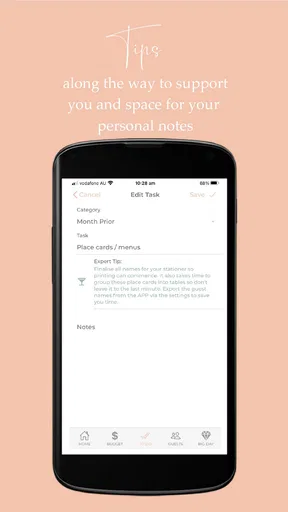
The app is intended to help users manage the main areas of wedding preparation from a single interface. Depending on the version and device, this may include creating to-do lists, tracking expenses, organizing supplier information, recording appointments, managing guest details, and keeping notes about decisions. These tools make it easier to follow progress, remember deadlines, and identify unfinished tasks as the wedding date approaches.
Can Manage My Wedding Planner help with the wedding budget?
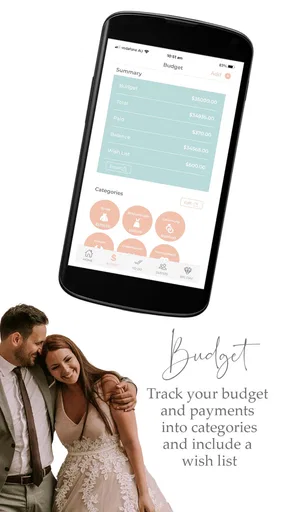
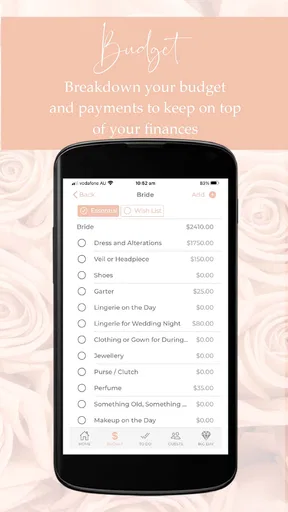
Yes, one of its most useful purposes is helping couples keep an eye on wedding-related spending. Users can record planned costs, payments, and supplier expenses so they have a better idea of how much has already been committed. However, the app should be treated as an organizational aid rather than professional financial software. It is still important to verify totals, payment dates, contracts, and outstanding balances directly with each supplier.
Can couples use the app to organize guests and suppliers?
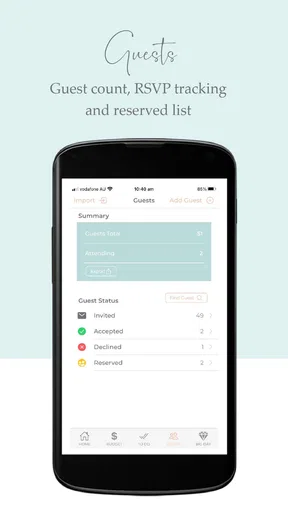
Manage My Wedding Planner is designed to keep practical wedding information together, including details connected with guests and service providers. This can help couples remember contact information, follow up on arrangements, and keep track of responsibilities such as catering, photography, music, flowers, transport, or venue requirements. Users should review entries carefully and maintain backups or copies of essential information, especially when it includes sensitive personal or contact details.
Is Manage My Wedding Planner suitable for planning a wedding with other people?
The app can be helpful when planning involves a partner, family members, or a wedding coordinator, because it provides a central place for tasks, notes, expenses, and important details. Before relying on it for teamwork, check whether the installed version supports account sharing, synchronization, or collaboration across devices. If those options are limited, users may need to manually share updates and should agree on who is responsible for keeping the information current.
